TL;DR:
Microsoft Graph and the Microsoft Graph PowerShell don't expose a simple way to read the Cloud Sync configuration.
Whilst there is a AADCloudSyncTools PowerShell module for Microsoft Entra Cloud Sync, this PowerShell module is not intuitive and lacks some of the essential configuration information.
This document uses Microsoft Graph PowerShell to analyse your tenant’s Cloud Sync configuration to display the information as seen in the Entra admin center.
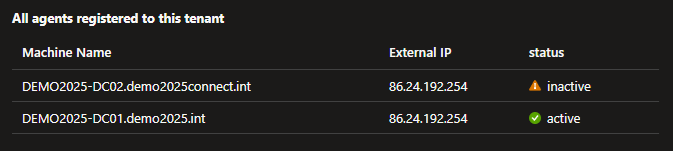
Agents
Entra Cloud Sync uses lightweight provisioning agents installed on one or more Windows Servers in your environment. This information is provided by the onPremisesPublishingProfile - this requires a direct call to the BETA endpoint.
# Connect to Microsoft Graph.
Connect-MgGraph -Scopes "Synchronization.Read.All";
# Get the agent groups.
Write-Host "Provisioning Agents";
$agents = Invoke-MgGraphRequest -Method GET -Uri "https://graph.microsoft.com/beta/onPremisesPublishingProfiles('provisioning')/agents/?$expand=agentGroups";
foreach ($agent in $agents.value)
{
Write-Host "Machine Name: $($agent.machineName)";
Write-Host "External IP: $($agent.externalIp)";
Write-Host "Status: $($agent.status)";
Write-Host;
}
Configurations
Entra Cloud Sync creates a service principal to represent each configuration. The service principal uses a specific application template identifier.
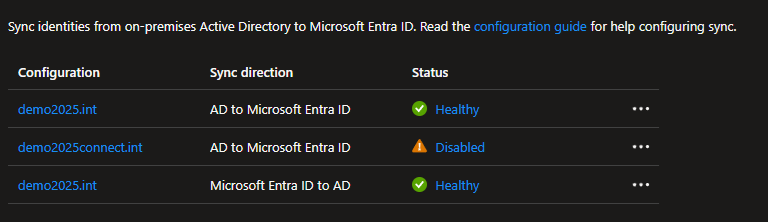
The AD to Microsoft Entra ID (AD2AAD) application template identifier.
1a4721b3-e57f-4451-ae87-ef078703ec94
The Microsoft Entra ID to AD (AAD2AD) application template identifier.
fb81332f-3eca-4ecf-a939-4278e501d330
The following code enumerates these configurations.
# Connect to Microsoft Graph.
Connect-MgGraph -Scopes "Synchronization.Read.All";
# The AD to Microsoft Entra ID (AD2AAD) application template identifier.
$activeDirectoryToEntraApplicationTemplateIdentifier = [guid]"1a4721b3-e57f-4451-ae87-ef078703ec94";
# The Microsoft Entra ID to AD (AAD2AD) application template identifier.
$entraToActiveDirectoryApplicationTemplateIdentifier = [guid]"fb81332f-3eca-4ecf-a939-4278e501d330";
# Get the configurations.
$configurations = Get-MgServicePrincipal -Filter "applicationTemplateId eq '$activeDirectoryToEntraApplicationTemplateIdentifier' or applicationTemplateId eq '$entraToActiveDirectoryApplicationTemplateIdentifier'";
# Display the configurations.
foreach ($configuration in $configurations)
{
Write-Host $configuration.DisplayName;
if ($configuration.ApplicationTemplateId -eq $activeDirectoryToEntraApplicationTemplateIdentifier) { Write-Host "Microsoft Entra ID" ;}
if ($configuration.ApplicationTemplateId -eq $entraToActiveDirectoryApplicationTemplateIdentifier) { Write-Host "Microsoft Entra ID to AD" ;}
Write-Host;
}
Synchronization jobs
Each configuration contains one or more jobs
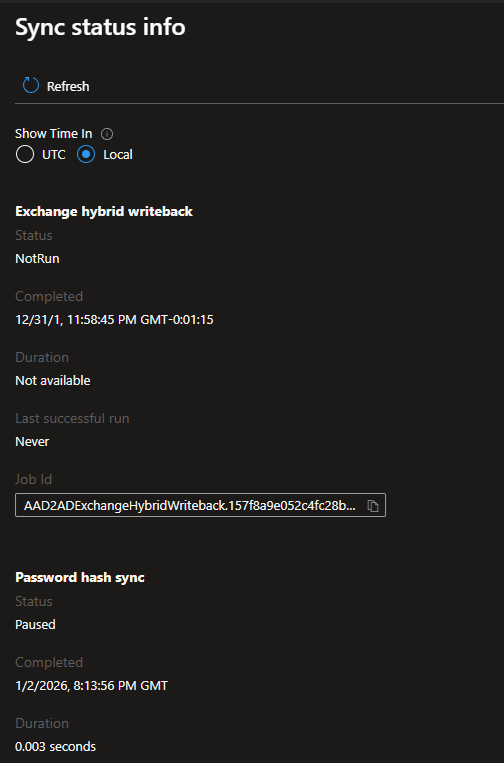
AD to Microsoft Entra ID
- User and group sync (AD2AADProvisioning)
- Exchange hybrid writeback (AAD2ADExchangeHybridWriteback)
- Password hash sync (AD2AADPasswordHash)
AD to Microsoft Entra ID (AD2AAD)
- Group provisioning to Active Directory (AAD2ADGroupProvisioning)
# Get the jobs within the configuration.
$jobs = Get-MgServicePrincipalSynchronizationJob -ServicePrincipalId $configuration.Id;
foreach ($job in $jobs)
{
if ($job.TemplateId -eq "AD2AADProvisioning") { Write-Host "User and group sync"; }
if ($job.TemplateId -eq "AAD2ADExchangeHybridWriteback") { Write-Host "Exchange hybrid writeback"; }
if ($job.TemplateId -eq "AD2AADPasswordHash") { Write-Host "Password hash sync"; }
if ($job.TemplateId -eq "AAD2ADGroupProvisioning") { Write-Host "Group provisioning to Active Directory"; }
Write-Host "Job ID: $($job.Id)";
Write-Host "Status: $($job.Status.Code)";
Write-Host "Last Run: $($job.Status.LastExecution.TimeEnded)";
Write-Host;
}
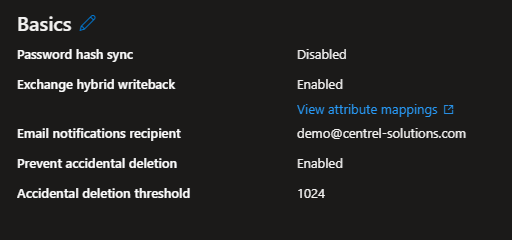
Properties (basics)
The properties displayed for a configuration are stored in multiple places. The primary location is the SyncNotificationSettings property of the synchronization secrets for the service principal.
The SyncNotificationSettings are stored as JSON within a JSON property so have to also be converted.
$secrets=Invoke-MgGraphRequest-MethodGET-Uri"https://graph.microsoft.com/beta/servicePrincipals/$($configuration.Id)/synchronization/secrets";
$syncNotificationSettingsRaw=$secrets.value |Where-Object { $_.key -eq"SyncNotificationSettings" }
$syncNotificationSettings= ($syncNotificationSettingsRaw.value |ConvertFrom-Json);
Write-Host"Email notifications enabled: $($syncNotificationSettings.Enabled)";
Write-Host"Email notifications recipient: $($syncNotificationSettings.Recipients)";
Write-Host"Prevent accidental deletion: $($syncNotificationSettings.DeleteThresholdEnabled)";
Write-Host"Accidental deletion threshold: $($syncNotificationSettings.DeleteThresholdValue)";
Password hash sync
Whilst there is a AD2AADPasswordHash synchronization job this is not affected by the "Password hash sync" checkbox.
# Determines whether password hash sync is enabled for the job. This only applies to "User and group sync" jobs.
function Get-IsPasswordHashSyncEnabled {
param (
$Job
)
$schema = Get-MgServicePrincipalSynchronizationJobSchema -ServicePrincipalId $configuration.Id -SynchronizationJobId $Job.Id;
foreach ($objectMapping in $schema.SynchronizationRules[0].ObjectMappings)
{
if ($objectMapping.SourceObjectName -eq "user")
{
foreach ($attributeMapping in $objectMapping.AttributeMappings)
{
if ($attributeMapping.TargetAttributeName -eq "CredentialData")
{
return $true;
}
}
}
}
return $false;
}
Attribute mappings
The attribute mappings are stored as part of each object mapping.
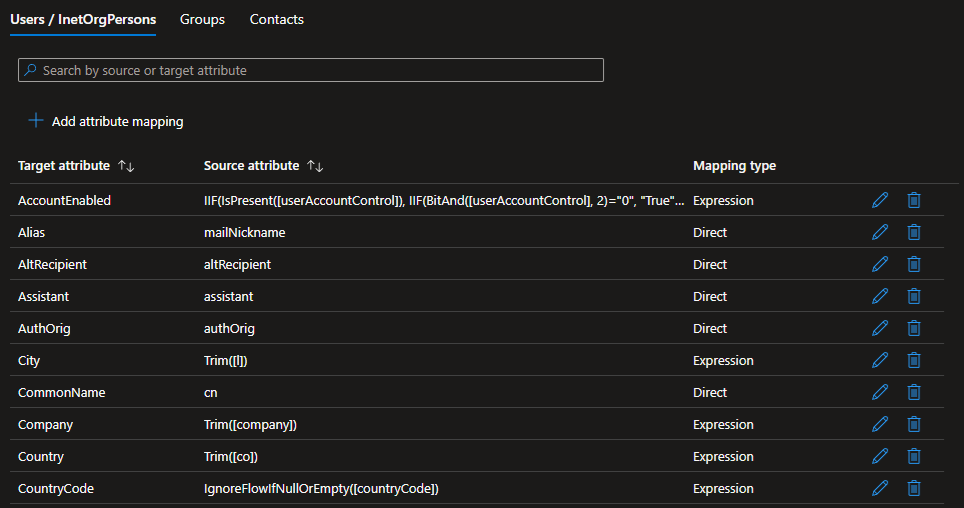
$schema = Get-MgServicePrincipalSynchronizationJobSchema -ServicePrincipalId $configuration.Id -SynchronizationJobId $job.Id;
foreach ($objectMapping in $schema.SynchronizationRules[0].ObjectMappings)
{
Write-Host ("$($objectMapping.SourceObjectName) Mappings");
foreach ($attributeMapping in $objectMapping.AttributeMappings)
{
Write-Host " $($attributeMapping.TargetAttributeName)";
Write-Host " - $($attributeMapping.Source.Expression)";
Write-Host " - $($attributeMapping.Source.Type)";
Write-Host;
}
}
Exchange hybrid writeback
To determine whether Exchange hybrid writeback is enabled the configuration must be searched for a job with the template identifier AAD2ADExchangeHybridWriteback.
# Determines whether Exchange hybrid writeback is enabled for the configuration. This only applies to "Microsoft Entra ID to AD" configurations.
function Get-IsExchangeHybridWritebackEnabled {
param (
$Configuration
)
$jobs = Get-MgServicePrincipalSynchronizationJob -ServicePrincipalId $Configuration.Id;
foreach ($job in $jobs)
{
if ($job.TemplateId -eq "AAD2ADExchangeHybridWriteback") { return $true; }
}
return $false;
}